
The care team
Share a patient with colleagues, see who is on the team, read each other's notes, keep a private team chat, and follow a full history of who changed what, including clinicians at other clinics.
A patient rarely has just one clinician. A therapist, a dietician, and a prescriber often work the same person. The care team brings them into one shared workspace: everyone sees the same patient, edits the same plans, reads each other's notes, and can talk to each other, even across different clinics.
Sharing a patient never bypasses consent. Each clinician on the team has their own signed authorization with the patient. The care team simply brings those individual consents together into one view; it does not create a shared, blanket authorization.
This page is about sharing one patient with a colleague. Getting a colleague onto your clinic in the first place is a clinic-admin task done in Settings; see Adding your team. Once they are on staff, you bring them onto a specific patient here.
The care team panel
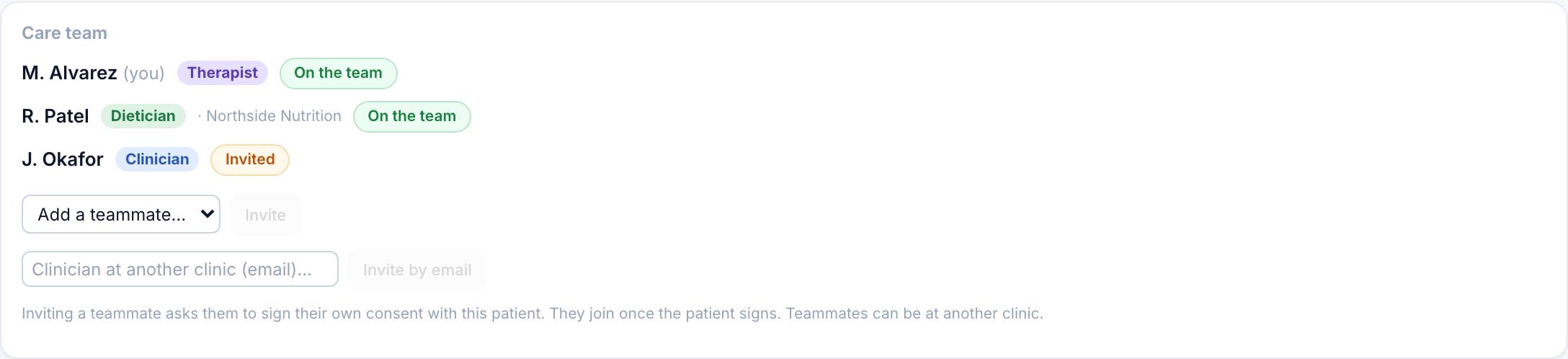
At the top of a consented patient sits the Care team panel. It lists every clinician with a consent record for this patient, each with:
- their name and a role badge (Therapist, Dietician, Clinician, Counsellor),
- their status: On the team (granted), Invited, or Awaiting patient,
- and, for a teammate at another clinic, the name of their clinic.
Adding a teammate
Two ways, depending on where your colleague works:
Either way, the teammate is invited, not instantly added. They sign their own consent with the patient, the patient signs, and only then do they appear On the team with full access. Nothing is shared until those signatures are in.
A dietician at one clinic and a therapist at another can share the same patient. Each keeps their own consent and their own clinic; the shared clinical record (notes, measures, history, team chat) is merged across the clinics on the team so everyone sees the same thing.
Shared notes and measures
Clinical notes and standardized measures are now shared across the care team and badged by author. You see every teammate's notes for this patient, with their name and role, and they see yours. You can only pin or delete your own.
This replaces the old "private to you" behavior: notes are a shared clinical record for the team, not a personal notebook.
Team Chat
The Team Chat tab is a private thread for the clinicians on this patient's team to talk to each other. The patient never sees it; it is entirely separate from the patient Messages tab. Use it for handoffs, questions, and coordination ("bumped her lunch target, can you reinforce in session?").
History
The History tab is a running record of who changed what, when: notes added, measures recorded, the meal plan or safety plan updated, a teammate joining. It merges activity from every clinic on the team, newest first, so the whole team can see how the patient's care has moved.
Roles
Role labels (Therapist / Dietician / Clinician / Counsellor) are set per staff member in Settings → Staff. They are labels only: they show on the team and as authorship, and never restrict what a teammate can edit. Everyone on the team can edit everything; the labels just tell you who is who.