
Family access (FBT support)
A patient can invite a family member into a scoped, read-mostly view of the same dashboard to support Family-Based Treatment, with the journal, chat, notes, and scores always excluded and consent the patient can revoke anytime.
Family-Based Treatment (FBT, the Maudsley approach) puts a parent or caregiver at the center of refeeding, so the family needs to actually see how meals and check-ins are going. Family access lets a patient invite a family member into the same dashboard you use, but on a scoped, read-mostly view of just that one patient. The patient starts it, the patient controls it, and the patient can end it whenever they want.
Nothing here is clinician-configured. There is no toggle on your side to turn this on. It begins with the patient, and your only job is to know it exists and to see who has access.
Reach for family access when a parent or caregiver is doing the day-to-day work of refeeding and needs to see how meals are actually landing between sessions. It is the FBT-supporting surface: the supporter watches meals, check-ins, and mood, reads the safety plan, and leaves you a caregiver's read of the table. Point the patient to their own Settings, Data Sharing to invite them; you do not set it up.
A family supporter does not need a computer. The same dashboard is available as a mobile app on both the App Store (iPhone) and Google Play (Android) called Pippa for Clinicians, so a parent can support meals from their phone. It is the same login and the same data as the web dashboard, just on their phone, and it opens on the scoped family view described below. The web dashboard and Pippa for Clinicians are two windows onto the same account.
How a family member gets in
The patient invites them from inside their own app, on the Settings tab under Data Sharing. They type the family member's email, an optional name, and how they are related, and send. The backend creates a family login and emails a set-password link to that address. There is no signature flow and no waiver, unlike the clinician consent gate, because the patient is granting this directly and can take it back just as directly.
The invite lives in the patient's app under Settings, Data Sharing. The patient adds and removes supporters themselves; you never send these invites for them.
Once they accept and set a password, the family member logs into the same dashboard you do, either in a browser at family.getpippa.app or through the Pippa for Clinicians app (iPhone or Android) with the same login. Either way they land on their patient's page directly. They never see a roster, another institution, or any patient but their own.
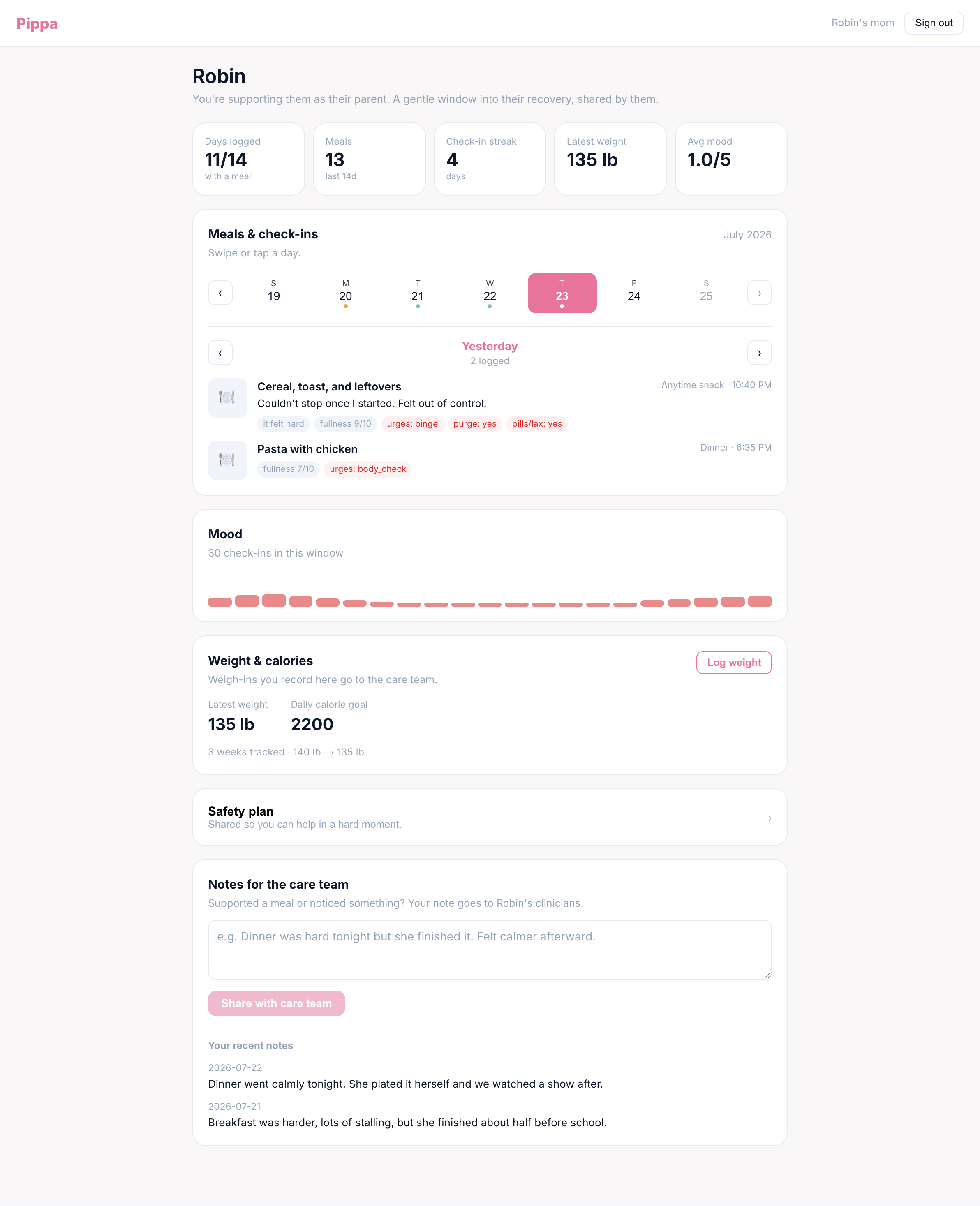
What a family member can see
The scoped view is built for supporting meals, not for clinical review. It shows what a caregiver at the table needs:
| Family can see | Why |
|---|---|
| Meals, photos, and check-ins | So the supporter knows what happened at each meal and how it landed. |
| Adherence and engagement | So they can see whether meals are being completed and logged. |
| Mood check-ins | So they can read the emotional weather around eating. |
| Weight and calorie numbers | FBT caregivers are often responsible for the plan, so these stay visible. |
| The safety plan | So a supporter knows the coping steps and contacts if a crisis starts. |
What a family member can never see
Some things are never part of the family view, no matter what:
- The private journal. The patient's diary is excluded from family access, even when the patient separately opts in to share it with clinicians. See what you can't see.
- AI chat transcripts. Conversations with Pippa are never surfaced to a family member.
- Clinical notes. Your private notes and meal reviews are clinician-only and stay that way.
- Standardized scores. EDE-Q and other measure results are not reachable from the family view.
These four are excluded structurally, not by a setting. There is no configuration, for the patient or for you, that exposes the private journal, AI chat, your clinical notes, or questionnaire scores to a family member. The patient can share meal and mood data with a caregiver without ever opening their diary or their therapy transcript.
What a family member can do: observations
The one thing the family view lets a supporter write is a meal-support observation, a short note about how a meal went from the caregiver's side. What did it take to complete the meal, how was the mood, what helped. These are not messages and there is no reply. They are notes for the care team.
Family observations show up on your side in the Family support (FBT) card on the patient's Overview tab, alongside the list of who has family access. You get the family's read of the table that the logs alone can't give you.
When there is no clinician: de-facto access
There is one important expansion. If a patient has no clinician attached, meaning no active per-clinician consent, the linked family member becomes the de-facto clinician and gets the fuller surface a clinician would have: the care settings, the toggles, weight and height and calorie goal, the meal plan editor, goals, and the eating-mode and cadence controls. A family running FBT without a professional on the case can still actually manage the app.
The moment a clinician is attached, the family member drops back to the scoped read-mostly view above. Care settings, plans, and goals become the clinician's again.
| Patient's situation | What the family member gets |
|---|---|
| A clinician is attached | The scoped, read-mostly view: meals, check-ins, mood, weight and calorie numbers, the safety plan, plus observations. |
| No clinician attached | The de-facto clinician surface: the scoped view plus care settings, plan and goal editors, and the app-management toggles. |
You do not switch this on or off. It follows from whether the patient has an active clinician consent. Attach a clinician and family de-facto access recedes on its own; the family stays a supporter with the scoped view.
Consent stays with the patient
This is the through-line: the patient owns family access from start to finish.
- Patient-initiated. No family member can request access. Only the patient can invite one, from their own app.
- Reversible. The patient can remove a family member anytime from the same Data Sharing settings, and access ends. There is no clinician approval in the loop.
- Transparent to the care team. You always see who has family access on the Overview tab, so consent is never hidden from you. See the consent model for how this fits the rest of a patient's sharing choices.
ED-safety rails
- Patient-controlled. The patient invites, the patient revokes. Consent is theirs and it is reversible at any moment.
- Journal, chat, notes, and scores are always excluded. No setting exposes them to a family member.
- Transparent. The care team always sees who has family access, so sharing is never secret.
- De-facto only when there's no clinician. Fuller family access exists solely to let an unattended FBT case function, and recedes the instant a clinician is attached.