
Plan support notes
An opt-in, per-patient switch that lets Pippa gently notice when a planned food group looks missing from a logged meal, framed as a floor and never a grade, with the patient's own self-assessment always coming first.
Your dietitian builds a meal plan with a patient, slot by slot. It is a fair question whether a given meal came together the way that slot was set up. Plan support notes is the switch that lets Pippa help answer it, carefully. When it is on, and only for slots that have a dietitian target, Pippa compares the meal photo to the plan and can gently notice when a planned component looks like it is missing.
This is the most food-adjacent thing Pippa can do, and we treated it that way. It is off by default, opt-in per patient, and built on one rule that shapes everything below: a recovery meal plan is a floor, not a ceiling. Pippa can only ever notice a missing group. It never notices excess, never comments on amounts, never flags additions or substitutions. Eating more is always fine, always silent.
The choice this card gives you
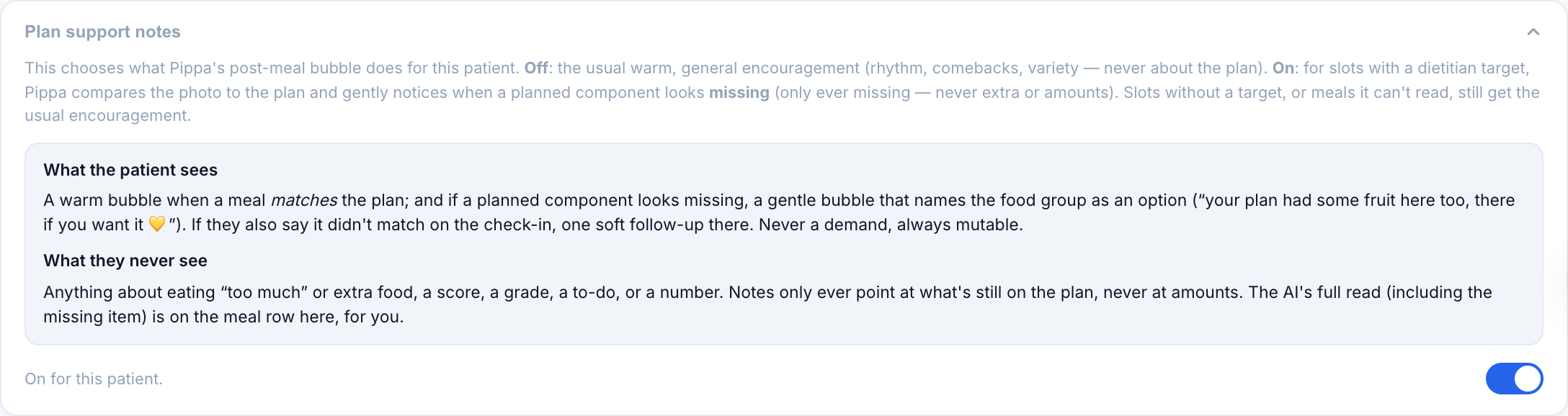
The card is a single toggle with an explanation.
| State | What the patient's app does |
|---|---|
| Off (default) | The usual warm, generic Pippa bubble after a log. Nothing is compared to the plan. |
| On | For slots with a dietitian target, Pippa compares the photo to the plan and may gently notice a missing group, on the safe paths described below. |
Nothing happens until you deliberately turn it on for a patient. A patient whose care team never opens this card gets the app exactly as the rest of these docs describe.
What the patient sees when it is on
There are two moments, and they are deliberately different.
At log time, only the good news. When the meal matches the plan, Pippa's bubble can warmly celebrate it. When something looks missing, the bubble says nothing about it. The bubble is the app's warmest object and the hour after eating is the peak-distress window, so it never carries a gap. At most, on a partial, you may see a soft, optional invitation that names the group without grading, like an open door.
At the check-in, only after the patient answers first. The existing plan-adherence question comes first, in the patient's own words. Only if they answer no or mostly (or leave it blank) does one gentle invitation appear underneath, validation first and zero obligation. If they answer yes, the app says nothing, no matter what the AI saw. It never contradicts the patient.
This invitation appears at most once a day, and the patient can quiet it entirely with a pause plan notes switch in their Settings check-ins section. Pausing notifies no one.
A recovery meal plan is a minimum, so Pippa only ever notices a group that looks missing. It never comments on how much was eaten, never flags an extra or unplanned food, and never treats eating more than the plan as anything but a win. There is no path in this feature that produces a "too much" or a "that wasn't on the plan."
What you see on the dashboard
The clinician side carries more than the patient's, and that is intentional. The AI's raw read lands on each meal row, next to the patient's own chip answer, labeled plainly as an estimate.
| On the meal row | What it means |
|---|---|
| Patient answer | The patient's own yes / mostly / no to "did this match your plan?" |
| AI estimate — may be wrong | Pippa's read of the photo: matched, a specific group possibly missing, or unsure. Always labeled an estimate. |

The AI does detection only. It returns matched, partial, or unsure, and nothing more. Every sentence the patient ever sees is a fixed, human-written template, not something the model composed. When the AI's read and the patient's answer disagree, that shows on your side as neutral signal, the kind of thing worth raising like a human at the next session. It is never surfaced to the patient.
If a patient says yes and the AI read partial, the dashboard shows both, side by side, with the AI's read labeled an estimate. The patient's app stays silent. Vision is sometimes wrong, and a false "the yogurt is missing" delivered to someone who ate the yogurt is exactly the kind of invalidation this feature is built to avoid, so uncertainty always resolves to quiet.
When it is forced off
Some settings turn Plan support notes off no matter what this card says, with an explanation on the card so you know why.
| Condition | State |
|---|---|
| ARFID mode | Forced off. Pressure ruins exposure work. |
| Intuitive eating mode | Forced off. There is no plan to compare against. |
| Slot has no dietitian target | Off. Nothing to compare. |
| Skipped meals, backfilled logs | Off. Only fresh, in-the-moment photo logs are compared. |
Why it is built this way
No eating disorder app auto-grades a meal. Recovery Record, the closest clinical precedent, gives only unconditional affirmations, and that absence of grading is a deliberate clinical decision, not a gap in the market. The cautionary tale is NEDA's Tessa chatbot, pulled offline in 2023 after it generated harmful advice. That is why this feature defaults off, stays clinician-gated per patient, and never lets the model write the words a patient reads.
ED-safety rails
- Default off. Nothing changes for a patient whose care team never turns this on.
- Floor, not ceiling. Pippa notices a missing group only. Never excess, amounts, or additions.
- Self-assessment first. The patient answers "did this match your plan?" in their own words before any note appears.
- Never contradicts the patient. A yes is always the last word. The app stays silent.
- Patient-mutable. A "pause plan notes" switch in Settings quiets it, notifying no one.
- Forced off where it does not belong. ARFID mode and intuitive eating mode disable it entirely.
- The AI detects, humans write. The model returns only matched, partial, or unsure. Every patient-facing line is a fixed, human-written template.