
Care approach
The card that reshapes one patient's app: which care approach they are in, and the individual surfaces you can drop or add. Your dashboard always shows everything regardless.
Most patients do best with structure: a plan, gentle progress, a fullness scale. But some care teams are actively practicing Intuitive Eating with a patient (Tribole & Resch), and for them the numbers and plans get in the way of the work. The Care approach card on the patient's Settings tab is where you make that call, per patient, without changing anything for anyone else.
It is off by default. Every patient starts in Structured, which is the app exactly as the rest of these docs describe it. Nothing happens until you deliberately switch a patient over.
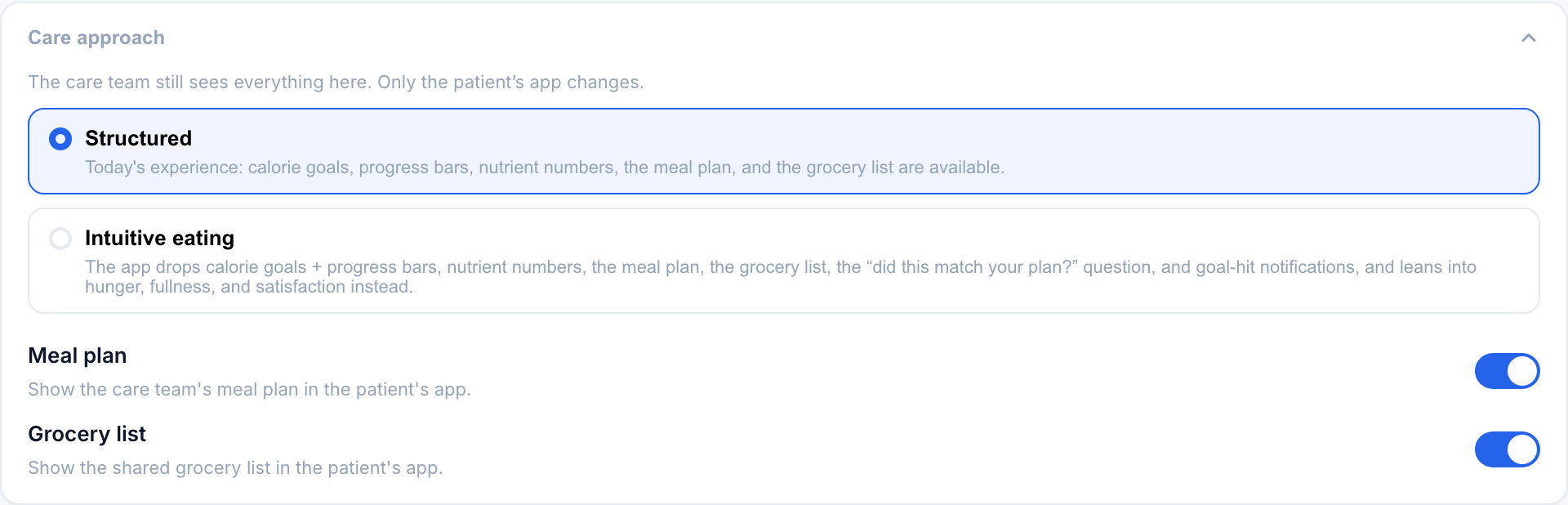
Today’s experience: calorie goals, progress bars, nutrient numbers, the meal plan and the grocery list are available.
Drops numbers, plans and progress in favour of hunger, fullness and satisfaction.
For appetite taken by medical treatment rather than by an eating disorder. Turning it on clears ARFID mode and sets structured.
Adds one gentle morning card asking what time they woke up. Wake time only, and no score.
Not for every patient. The patient never sees the finished photo and is never shown an amount.
Celebrates each new-food try, counts tries per food, swaps the urge chips for a steps-to-eating ladder.
Show the care team’s meal plan in the patient’s app.
Off shows the plan as an ordered list of meals and snacks with no times.
The four care approaches
The top of the card is the approach itself. These four are mutually exclusive — turning one on clears the others, and the server enforces that regardless of what the dashboard sends, so a patient cannot end up in two frames at once.
| Approach | What it means |
|---|---|
| Structured | The default. The full app: calorie goal, progress bars, nutrient numbers, the meal plan day view, the grocery list, and the plan-adherence question. |
| Intuitive eating | A permissive reframe. The app drops numbers, plans, and progress in favor of hunger and satisfaction cues. See below for exactly what changes. |
| ARFID mode | Retunes the app for avoidant/restrictive food intake disorder: quiet new-food celebration, try counting, a steps-to-eating ladder instead of urge chips. Sets structured. |
| Treatment mode | For appetite taken by medical treatment rather than by an eating disorder. Strips everything that scores eating, adds symptom tags. Sets structured. |
The approach is permissive, not prescriptive. Absent any switch, the app stays structured.
The individual toggles
Below the approach are independent on/off switches for single surfaces, so you can drop or add one thing without committing to a whole reframe.
| Toggle | Default | What it does |
|---|---|---|
| Meal plan | On | The meal-plan day view in the patient's app. |
| Grocery list | On | The shared grocery list. |
| Clock times on the meal plan | On | Off shows the plan as an ordered list of meals with no times. Useful when a stated time reads as a deadline and a missed 3pm snack gets skipped entirely. See Meal plans. |
| Patient can edit past entries | Off | Adds a pencil above the ✕ on each meal on their Check-in page, and an Edit button beside Ask about this meal in the meal detail. They can correct what they had, the time (within that day) and which meal it was, and leave you a note. Only works while they can see what they logged, and only on the days their view reaches: today alone with the whole month off, any day with it on. Edited meals carry an edited chip in the food log (edited after review if you had already reviewed it), their note is saved to their journal and shows under Patient's Notes on the Notes tab as Note on a meal, the same way shared journal entries do, so it needs journal sharing on. The latest note also sits on the meal itself in the Food Log (a patient note chip, and the full note when you expand the meal). Each edit appears in History. |
| Patient can see what they logged | On | Blind Mode. Off hides their own food from them entirely: photos, written logs, meal times, day badges, and the progress bar. They can still log and check in; you still see everything. |
| Patient sees the whole month | Off | Off keeps their meal log on today: no month grid, no route to a past day. On gives them the month calendar and any past day. Has no effect while Blind Mode is on. |
| Sleep mode | Off | Adds one morning question, what time they woke. No bedtime, no duration, no score. |
| Finished-plate photo | Off | Pairs the plate as served with the plate when finished, for your eyes only. Not for every patient — read the page first. |
| Daily plan | Off | A short morning plan-your-day surface in the patient's app. |
The four approaches clear each other. Sleep mode is orthogonal and sits alongside any of them.
Switching a patient to Intuitive eating forces the Meal plan and Grocery list toggles off, because both surfaces are hidden in that mode anyway. Your stored choice is remembered, so switching back to Structured restores exactly what you had.
It also forces the Finished-plate photo off, and will not let you turn it on while intuitive. That one is not just tidiness: intuitive eating exists to stop quantifying intake, and a completion measure is the opposite frame. The server enforces it from both directions, so you cannot assemble the contradiction by flipping the two switches in the wrong order.
What the patient's app hides in intuitive mode
When a patient is set to Intuitive eating, their app quietly removes everything that reads as a target or a score:
- the calorie goal and every progress bar
- nutrient numbers and targets (see Nutrition visibility)
- the meal plan day view (see Meal plans and the grocery list)
- the shared grocery list
- the "did this match your plan?" question at the post-meal check-in
- goal-hit notifications
None of this is deleted, it is just not shown to the patient. Flip back to Structured and it all returns.
What the patient's app adds in intuitive mode
Intuitive mode also reframes the check-in around body cues instead of plans:
- an optional pre-meal hunger cue, how hungry are you right now?, offered before the meal
- the plan-adherence question is replaced with a satisfaction reflection, was it satisfying?, answered with yes, kind of, not really, or didn't notice
- the emoji fullness scale is preferred over the 1-to-10 numbers
The dashboard still shows everything
This is the part to hold onto: intuitive eating mode only changes what the patient sees in their app. Your dashboard is untouched. You still get every log, the mood check-ins, fullness, and the full clinical picture. The new cues show up read-only on each meal in the Food Log as Hunger before n/10 and Satisfying?, right alongside everything you would normally see.
Turning on intuitive eating mode does not blind you. Calories, nutrient estimates, plan structure, and every check-in answer remain visible on your side. The switch reshapes the patient's experience; it never reduces what your care team can see.
ED-safety rails
- Default off. Nothing changes for a patient whose care team never opens this card.
- Reversible. Every hidden surface and stored toggle comes back the moment you switch to Structured.
- Clinician-controlled. Only the care team sets a patient's care approach.
- Dashboard-complete. Hiding numbers from the patient never hides them from you.