
Reminders
Schedule a gentle notification for one patient from the dashboard: one-time, daily, weekly, or a goal reminder, delivered to their phone in their own timezone.
The Reminders card lets you schedule a notification for one patient, so a nudge you would otherwise have to remember to send arrives on their phone on its own. A reminder can be one-time, daily, weekly, or a goal reminder that fires when the patient reaches a goal you pick, and it lands as a normal notification with a title and an optional short message you write.
Reminders are a companion to the Messages tab: messages are a back-and-forth thread, while a reminder is a scheduled, one-way nudge ("time for our check-in", "remember to take a slow breath before lunch").
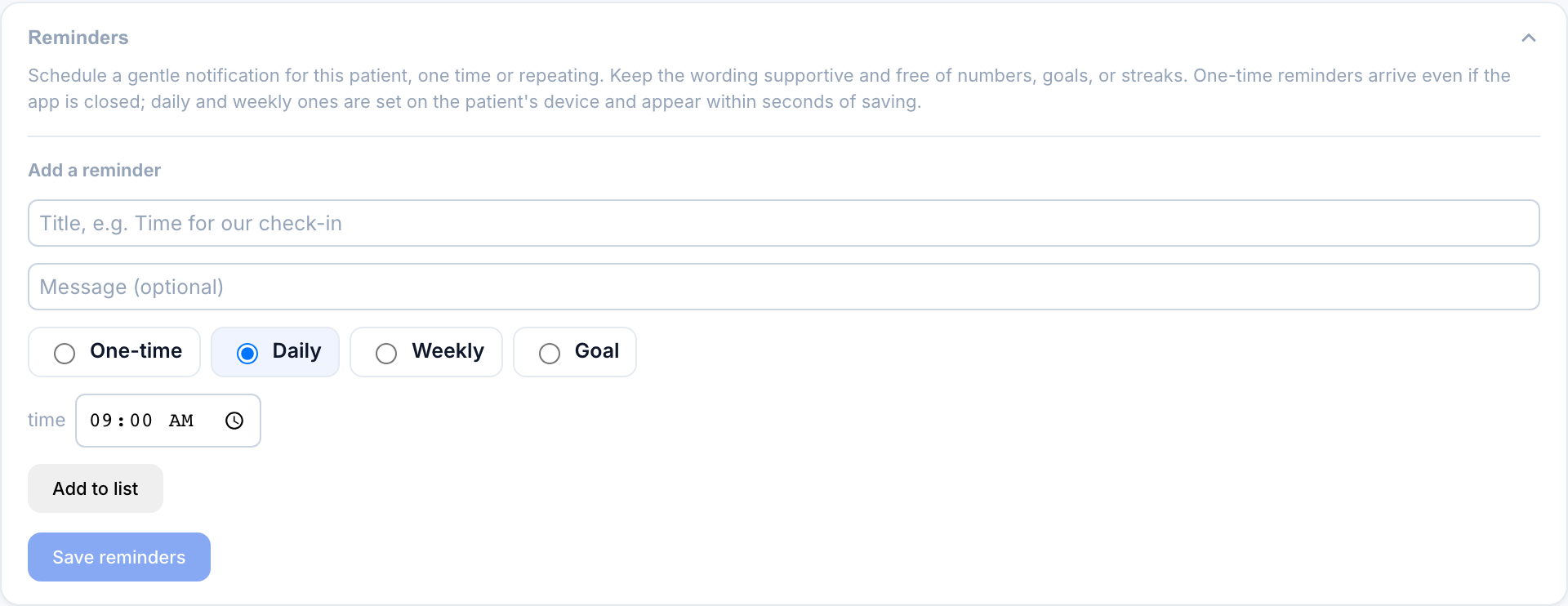
Creating a reminder
Open the patient from your roster and expand the Reminders card.
The title is what the patient sees first; the message is an optional second line. Keep both supportive and free of numbers, goals, or streaks (see the safety note below).
Choose One-time, Daily, or Weekly, then set the time. A one-time reminder also takes a date; a weekly one takes the days of the week it should repeat on.
Select Add to list to stage the reminder, then Save reminders to send the whole list to the patient's app. Changes reach the patient within seconds.
Reminder types
| Type | When it fires | Notes |
|---|---|---|
| One-time | Once, on the date and time you set | Must be in the future. Fires even if the app is closed. |
| Daily | Every day at the set time | Repeats until you delete or turn it off. |
| Weekly | On the chosen weekdays at the set time | Pick one or more days (for example Mon / Wed / Fri). |
| Goal | Automatically, when the patient reaches a goal you pick | No clock; it fires on the event. See below. |
Goal reminders
A Goal reminder is not on a clock. Instead of a time, you pick the moment that should trigger it: the patient meeting their calorie goal, hitting a nutrient target (protein, fiber, calcium, vitamin D, or veggies), reaching a check-in streak milestone, or logging a set number of meals. For a streak or a meals-logged trigger, you also set the number that counts as reaching it. When that happens, your reminder fires on its own.
The goal is the machine trigger only. The number lives in the trigger, never in the message. You write caring, number-free words ("proud of you for showing up today 💛"), and that is all the patient ever reads. A goal reminder can never surface a calorie count, a target, or a streak number to the patient, which keeps it on the right side of Pippa's no-score-keeping rule.
How it reaches the patient
Daily and weekly reminders are scheduled on the patient's device and appear within seconds of you saving. One-time reminders are delivered as a push at their exact moment, so they arrive even if the app is closed.
Every reminder fires in the patient's own timezone. The card shows the timezone we have on file for them next to the one-time date, so you can confirm when it will actually land.
If a patient hasn't opened the app on a device recently, we may not have their timezone yet, and one-time reminders fall back to a default zone. The card tells you which zone it is using.
Managing reminders
- Turn one off without deleting it using the on/off switch on its row. It stays in the list but stops firing.
- Delete a reminder to remove it entirely.
- Edit a time: delete the reminder and add a new one. This keeps an already-sent one-time reminder from firing twice.
- Up to 20 reminders per patient.
A reminder is patient-facing copy you write, so it is not filtered the way the app's own notifications are. Keep it gentle and free of numbers, calorie or weight references, goals, or streak language, so a nudge never reads as pressure or score-keeping. "Time for our check-in 💛" lands very differently from "you're behind on your logs."