
Nutrition visibility
A per-patient choice to let the app show a few nutrients, as gentle progress bars or a single daily suggestion line, while the app stays calorie-free either way.
By default the patient's app shows no nutrition numbers at all. But sometimes you, often as the dietitian, want a patient building specific nutrients. The Nutrition visibility card on the patient page makes that a per-patient prescription: off for everyone until you choose otherwise, and never anything to do with calories.
The card sits below the check-in cards, collapsed to a summary like numbers: protein 90g, fiber 25g targets · morning note on. Expand it to configure.
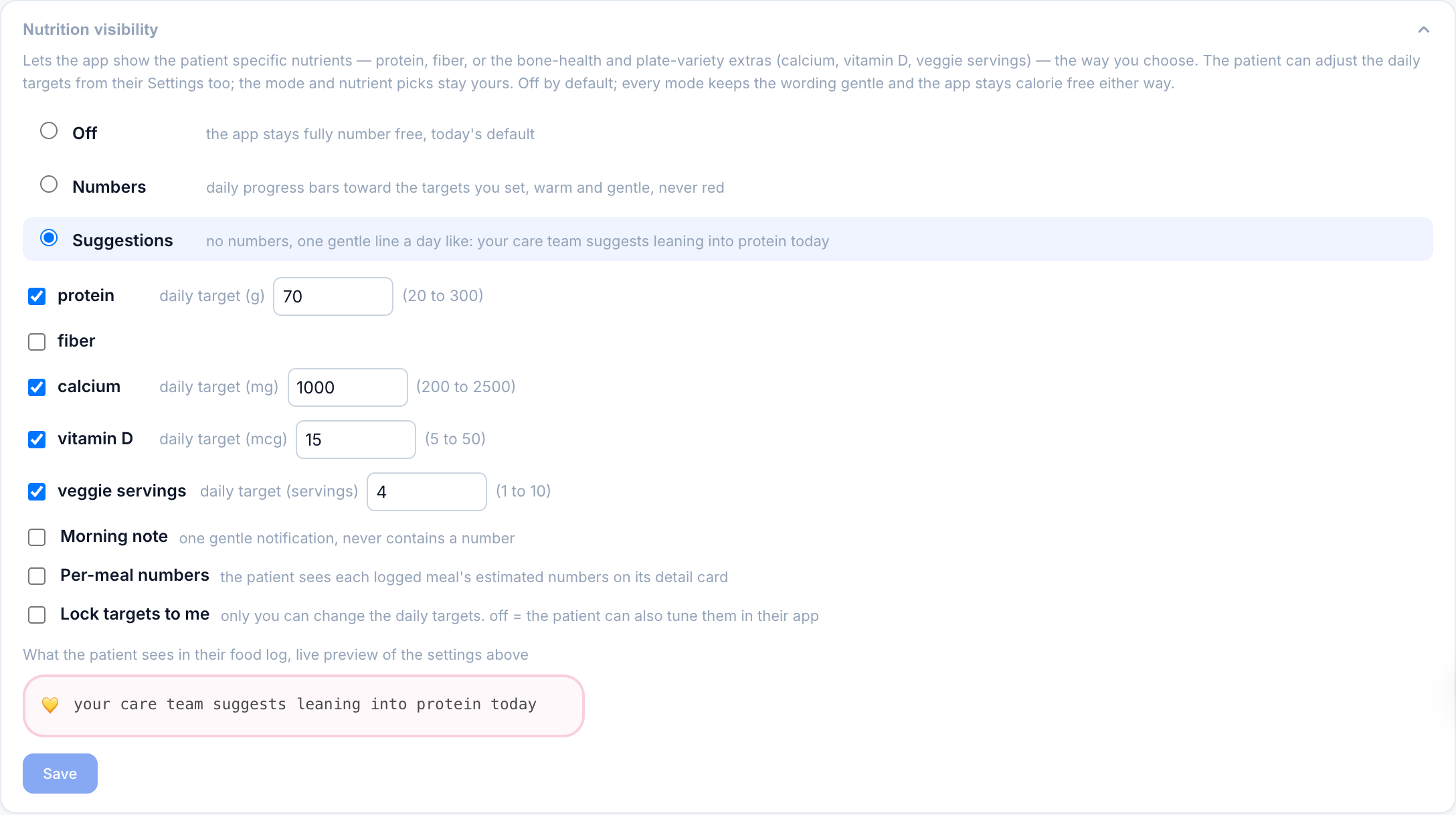
The three modes
| Mode | What the patient sees |
|---|---|
| Off | Nothing. The app stays fully number-free. This is the default. |
| Numbers | Daily progress bars in their food log, filling toward the targets you set, plus optional per-meal numbers for the chosen nutrients. |
| Suggestions | No numbers anywhere. One gentle line per day, like "your care team suggests leaning into protein today." |
Every nutrient in the panel is yours to switch on or leave off, grouped so a long list stays scannable:
| Group | Nutrients |
|---|---|
| Macros | protein, carbs, fat, saturated fat, fiber |
| Sugars | sugar, added sugar |
| Minerals | sodium, potassium, calcium, iron |
| Vitamins | vitamin D |
| Other | veggie servings |
Protein and fiber are the usual starting point. Calcium and vitamin D speak to bone health, iron to the fatigue that often comes with restriction, and veggie servings to plate variety. Carbs and fat used to be dashboard-only; they are now selectable too, because for some patients in refeeding seeing carbohydrate intake normalised is the point rather than the risk.
The list is long so that it covers the prescription you actually have, not so that you use all of it. Every nutrient you switch on is another number in front of someone whose relationship with numbers is the thing being treated. Two or three that matter beat thirteen that are merely available.
This is the Nutrition Facts set minus trans fat and cholesterol, plus veggie servings. Rarer micronutrients (B12, folate, zinc, magnesium, the other vitamins) are deliberately absent: a photo-based estimate of those would be fake precision.
In numbers mode each chosen nutrient needs a daily target. The bars fill toward the target in warm colors, never red, and going past a target just reads as done, never as failure. In suggestions mode the line is rule-based from yesterday's totals: on target gets validation, under target gets a gentle nudge, and words like "low," "only," or "behind" are never used.
Per-meal numbers
Per-meal numbers is an extra toggle in numbers mode. With it on, the patient also sees each logged meal's estimated numbers for the chosen nutrients on that meal's detail card, not just the daily bars. Leave it off to keep only the day-level bars; turn it on for a patient who benefits from seeing where a nutrient came from meal by meal.
The morning note
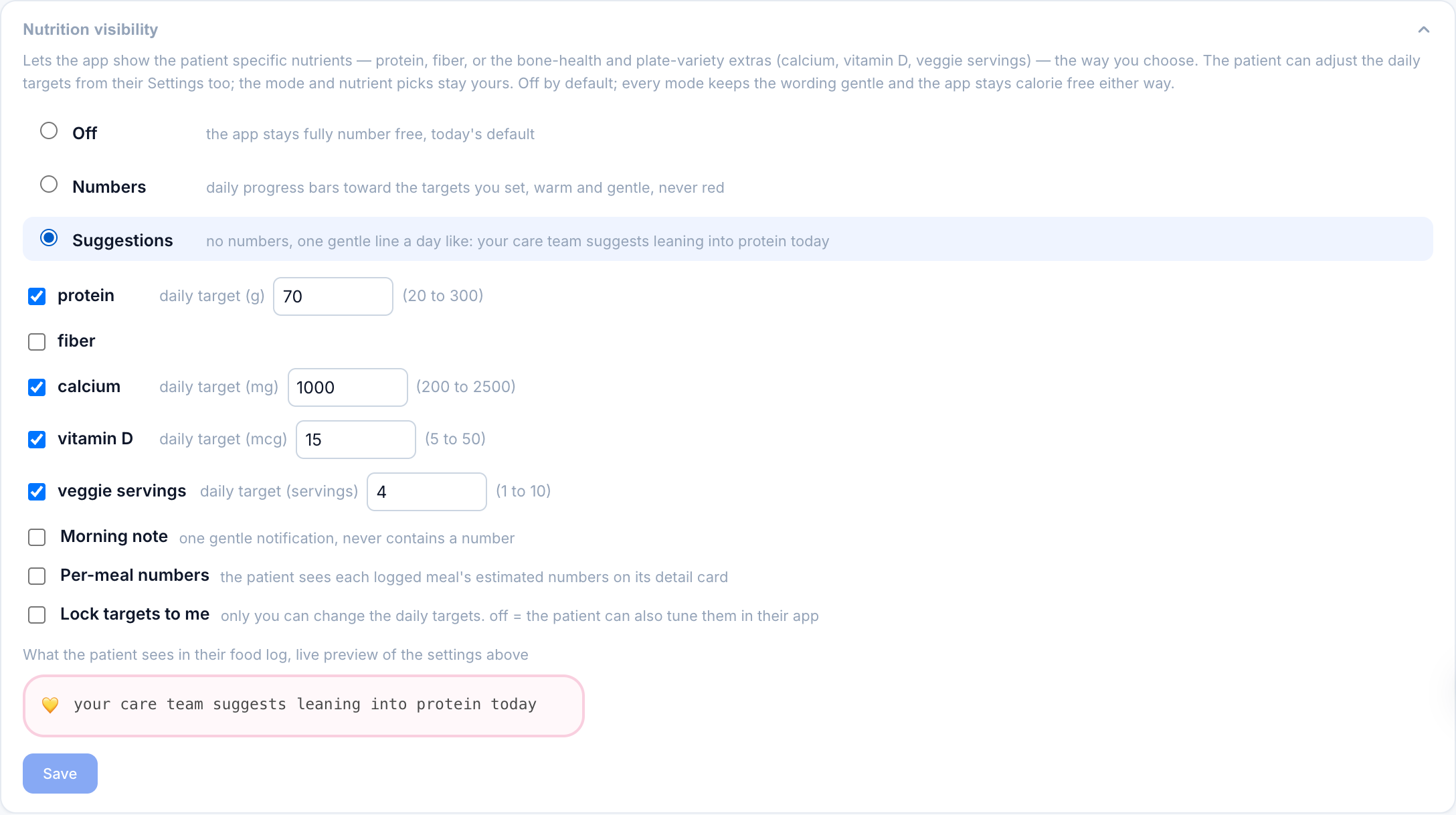
The Morning note toggle adds one optional morning notification. It never contains a number or a target, in any mode; it only says a gentle nutrition note from the care team is waiting in the food log. This keeps notifications free of anything that could read as score-keeping, which is a hard rule across Pippa.
Who sets the targets
By default, once numbers are on, the patient can also tune the daily targets themselves in the app's Settings, so it is a shared editing space: you set a sensible starting point, and they can nudge it to what feels workable. If you would rather own the targets, turn on Lock targets to me. Then only you can change them; the app shows the targets to the patient read-only, and any edit they try is refused. Leave the lock off for a collaborative patient, turn it on when the targets are a clinical prescription you do not want changed.
The live preview
The bottom of the card renders What the patient sees in their food log, live, in the app's own pink. Change the mode, a target, or the notify toggle and the preview updates before you save. If the preview looks like pressure, it is; pick a softer mode.
Where the numbers come from, and correcting them
Pippa's photo and description analysis estimates the whole panel for each meal (alongside calories). Those estimates show on meal rows in the Food Log as a line like 34g protein · 58g carbs · 16g fat · 5g fiber · 520mg sodium. The model is told to omit anything it cannot estimate honestly rather than guess, so a blank field means "unclear from the photo," not zero.
If an estimate looks off, expand the meal and use the Corrected nutrients inputs in the review form. Your corrected values replace the estimate everywhere, including the patient's daily bars. The form shows the macros always, plus any nutrient this patient has switched on or that already carries a value, so a meal row doesn't sprout thirteen inputs you'll never use.

This is the one distinction to hold onto. A calorie correction only affects your dashboard and analytics; the patient is shielded from calories no matter what. A nutrient gram correction is delivered to the patient's app whenever nutrition visibility is on, because the bars they see should be accurate. If you would not want the patient to see the number, check which field you are typing into.
ED-safety rails
- Default off. Nothing changes for any patient whose care team never opens this card.
- Calories stay hidden in every mode. This feature can never surface a calorie.
- No deficit framing. Bars never turn red, suggestions never scold, notifications never carry numbers.
- No history to ruminate on. The patient sees today's bars and one daily line, not charts of past days.
- Hidden in patient view. The config card is a clinician control, so a shared screen shows only what the patient's own app shows.
- Hidden for the patient in intuitive eating mode. If the patient's care approach is set to intuitive eating, these numbers and bars are not shown in their app, whatever this card says. Your corrected grams still reach you and the dashboard.