
The Food Log
The anatomy of a meal card, every check-in chip explained, and the four separate ways you respond to a meal: a comment the patient sees, a private note, a calorie correction, and a nutrient-gram correction.
The Food Log (labeled Food Log in the sidebar and Logs in the page heading) is a photo-forward, day-by-day view of everything the patient logged. Meals group under day headers (Today, Yesterday, then the weekday), each with a one-line rollup like "3 logged · 1 skipped · 2 urges · avg fullness 6.4." Tap any meal to expand it.

Anatomy of a meal card
A collapsed meal row carries the meal name, its photo, the time, the calorie estimate, a gram line of the AI's nutrient estimates, and a set of chips. Every check-in signal shows here on the collapsed row on purpose: you should never have to expand a meal to spot an urge or a purge disclosure.

Adherence and slot
- Adherence badge. Completing the post-meal check-in confirms the meal was eaten; a skip log records not eaten. A meal whose check-in was never opened stays pending. The badge reads ✓ Eaten, Not eaten, Awaiting check-in, or Analyzing… while the photo is still being processed. Not eaten uses a warning tone, not danger: it is the same honest disclosure as a skip, answered a day later. A deliberate skip shows a soft, neutral skipped chip, never danger styling. A skip is logged, never a failure.
- Slot tag. If the meal was logged from a meal-plan slot, its slot name (for example
Breakfast or Anytime snack) shows as a chip. An anytime snack is one logged
outside the plan's slots; the wire value is
extra, but patient-facing copy never says "extra" (snacks are part of the day, not on top of it).
The check-in chips
These come from the post-meal check-in (which you can turn off per patient from the Customizations tab).
| Chip | Wire meaning | What the patient saw |
|---|---|---|
| fullness x/10 | Post-meal fullness, 1 to 10 | 1 is still really hungry, 10 is painfully full |
| feeling chips | How the meal felt | For example "it felt hard," "anxious about it"; qualitative, never an amount |
| urge to eat less later | restrict | The urge to restrict |
| urge to purge | purge | The urge to purge |
| urge to binge | binge | The urge to binge |
| body checking | body_check | Body checking |
| purged: yes / no / rather not say | purged | Answer to "did you act on the urge to get rid of it?" |
| used: breathing / riding the wave / grounding / self-kindness / another skill | copingSkills | A coping skill the patient tried after the meal |
| matched plan: yes / mostly / no | planAdherence | How well the meal matched its slot's target, when the slot has one |
| your question: their answer | customAnswers | The patient's answer to a custom question you added, shown as "prompt: value" |
Urge and purge chips render in a calm info tone, never red. The patient chose to disclose them, and the interface is meant to read as care, not blame. Recurring urges roll up into a concern for you; they never surface a scolding message to the patient.
The free-text thought the patient attached to a log shows in quotes under the meal, and any feeling chips render both as emoji on the row and as text chips below.
Calories and grams on the row
Every non-skipped meal carries an AI calorie estimate and, next to it, a gram line like 34g protein · 58g carbs · 16g fat · 5g fiber. Both come from Pippa's photo analysis, and described meals get them too: when a patient types what they ate instead of photographing it, the AI estimates from the text assuming average portions, so text logs no longer sit at zero calories. A skipped meal has nothing to estimate and shows neither.
Where you have corrected a value, the correction wins on the row: corrected calories show with the original struck through and an edited tag, and corrected grams simply replace the estimate in the gram line.
When a patient removes a photo
A patient can take a meal photo off their own screen. There are two levels, and they land differently on your side:
- Hidden. The patient hides the photo from their own app. You still see it, and the meal row carries a small hidden badge so you know the patient no longer sees it. Nothing about the meal or its check-in changes.
- Deleted for good. From the app's Settings, a patient can delete for good, which removes the photo everywhere, including from your Food Log. The meal stays, but where the photo was you now see a small photo deleted by patient note.
Hiding is just for their own comfort and leaves your view intact. A delete-for-good is a permanent removal the patient chose; the note is there so a missing photo never looks like a glitch.
Reviewing a meal: four separate channels
Expand a meal to review it. There are four distinct things you can leave, and the difference between them matters clinically.
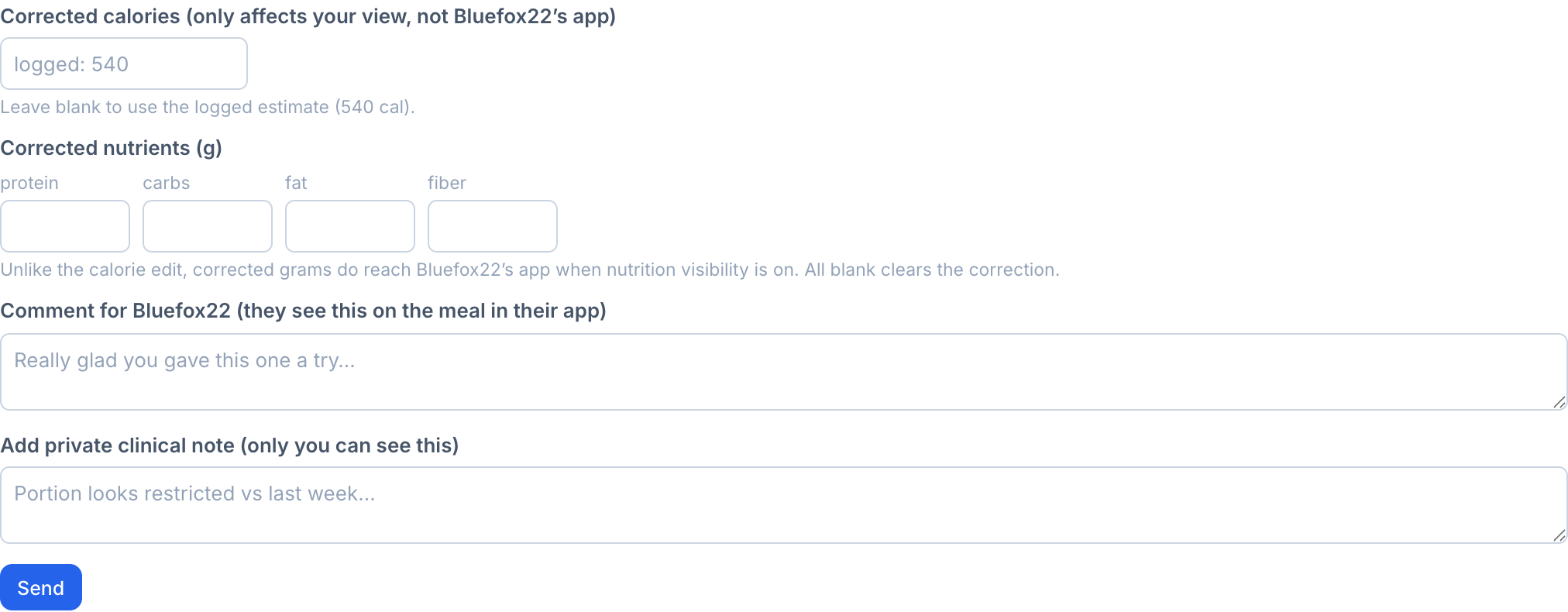
The Comment for [name] field is warm feedback that appears on the meal inside the patient's app, for example "Really glad you gave this one a try." This is the adherence feedback loop.
The private clinical note is author-only. Only the clinician who wrote it sees it. Use it for observations like "portion looks restricted vs last week." It is never shown to the patient.
The Corrected calories field lets you fix the app's estimate for a meal. It affects your view and the analytics only. It is never synced back to the patient, never changes what they logged, and produces no "your calories changed" surprise, because the patient is shielded from calorie numbers.
The Corrected nutrients (g) inputs fix the AI's protein, carbs, fat, and fiber estimates. Unlike the calorie edit, corrected grams do reach the patient's app whenever nutrition visibility is on for them, because the nutrient bars they see should be accurate. Leaving all four blank clears the correction.
Corrected calories never leave the dashboard. Corrected grams are patient-visible the moment nutrition visibility is in numbers mode. If a number should stay clinician-side, it belongs in the calorie field or a private note, not in the gram inputs.
Corrected calories are what the Nutrition charts and concern detection use for that meal. The correction fields are hidden on skipped meals, since there is nothing to correct.
A reviewed meal shows a Reviewed by [you] banner with the date, the patient-visible comment, and your private note (visible only to you). You can edit any of the three at any time.
Logging patterns (clinician-only)
At the top of the Food Log sits the Logging patterns card, summarizing behavioral signals across the patient's log history:
- Descriptive flags. Highlights noteworthy signals (such as heavy late-evening logging, extended logging gaps, or long intervals between meals) with subtle warning indicators. These are descriptive signals to scan, not diagnoses.
- Activity and timing metrics. Structured readout tiles for days logged, average logs per day, weekday vs. weekend patterns, typical eating window, and time-of-day distribution (AM, Midday, Evening, Late).
- Log quality & variety. Tracks real-time logging vs. backfilled entries, food variety percentage, skipped meals, and most-repeated foods.
Periodic notes for days and weeks
In addition to commenting on individual meals, clinicians can attach high-level reflections:
- Weekly note. Tap + Add weekly note directly beneath Logging Patterns to leave feedback for the whole week.
- Daily note. Tap + Add note under any day header to leave feedback for that specific day.
Periodic notes appear as an unread banner in the patient's daily check-in until opened, providing timely reinforcement without overwhelming the food log.