
Clinical Notes and Engagement
Care-team clinical notes, patient-opted-in journal entries, and engagement trends.
Two tabs round out the patient page. The Clinical Notes tab is the care team’s clinical record for this patient, and the Engagement tab shows how actively they are using the app.
The sidebar labels this tab Notes; its page heading is Clinical Notes.
The Clinical Notes tab
Notes are your clinical documentation for one patient. Each note records a session date (distinct from when you wrote it), a format, and a risk level, presented in clean, balanced metric tiles.
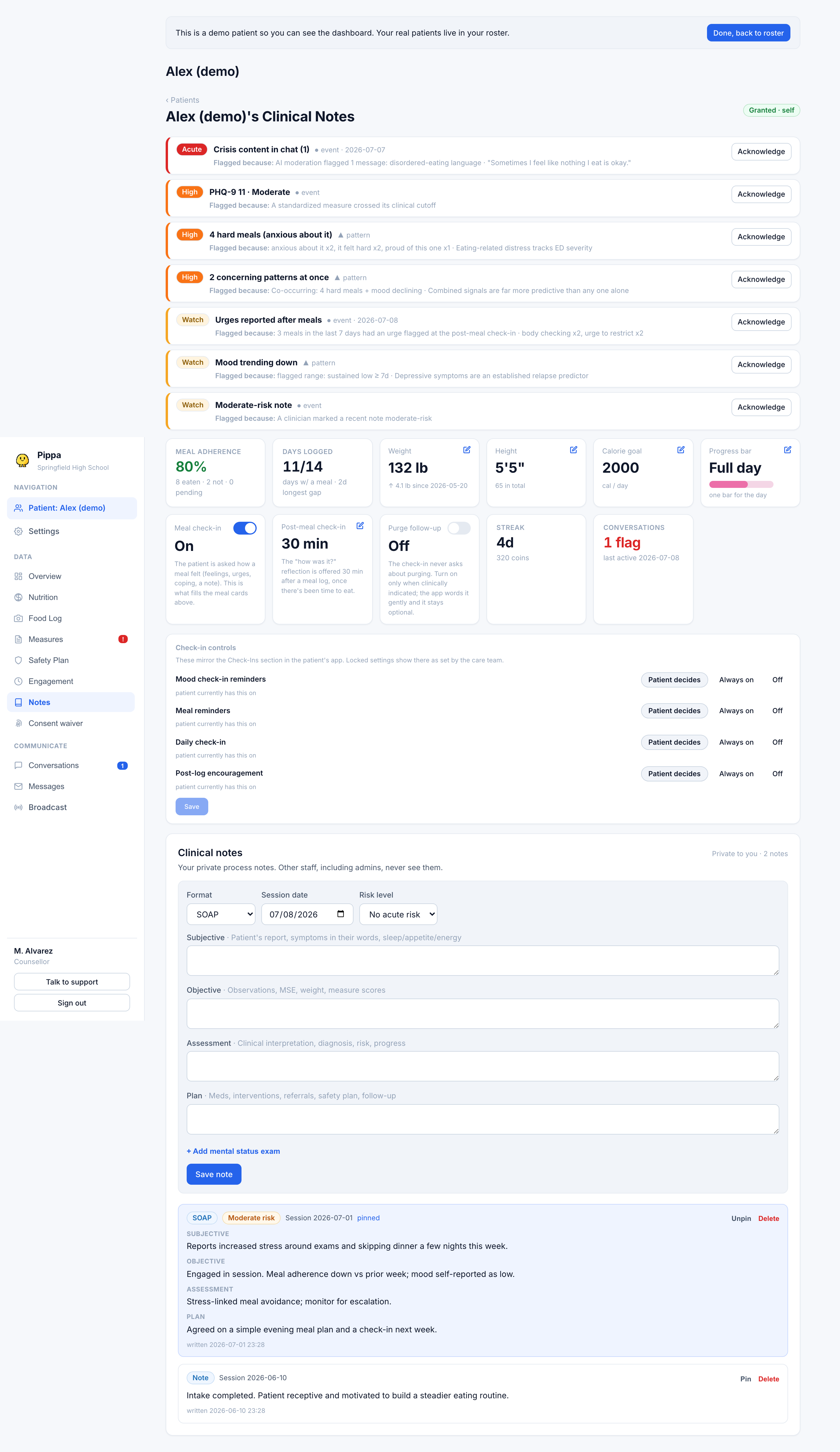
- Formats. Quick free-text, or the structured SOAP, DAP, and BIRP templates, plus optional mental status exam fields.
- Session date. The date the clinical session occurred, formatted consistently with the rest of the chart.
- Risk level. Each note carries none, low, moderate, or high. A high-risk note also surfaces on the patient's concern list and the roster at-risk column, so serious notes are not buried.
- Latest note. The most recent note is echoed on the patient overview as a snippet.
Clinical notes are shared across the care team for this patient, badged with the author's name and role. Clinicians can pin or delete only their own notes. The patient never sees clinical notes.
Patient's Notes (Shared Journal Entries)
When a patient opts in to share their journal in their app, their entries appear under Patient's Notes on this tab. Your request alone does not grant access. See Journaling and optional sharing.
- Unedited patient words. Entries are shown verbatim as written by the patient with exact date and time stamps.
- Read gently. These entries provide authentic qualitative context into the patient's day-to-day reflections, coping exercises, and grounding moments.
Deleting a note
Deleting a note removes it from the shared chart. Clinicians can delete only notes they authored. Because a note is your record of care, delete deliberately. Deleting a high-risk note also clears the concern it raised.
The Engagement tab
Engagement answers a different question from the clinical tabs: is this patient still showing up? It gathers weight trend, weekly activity, and the app-usage signals in one place.
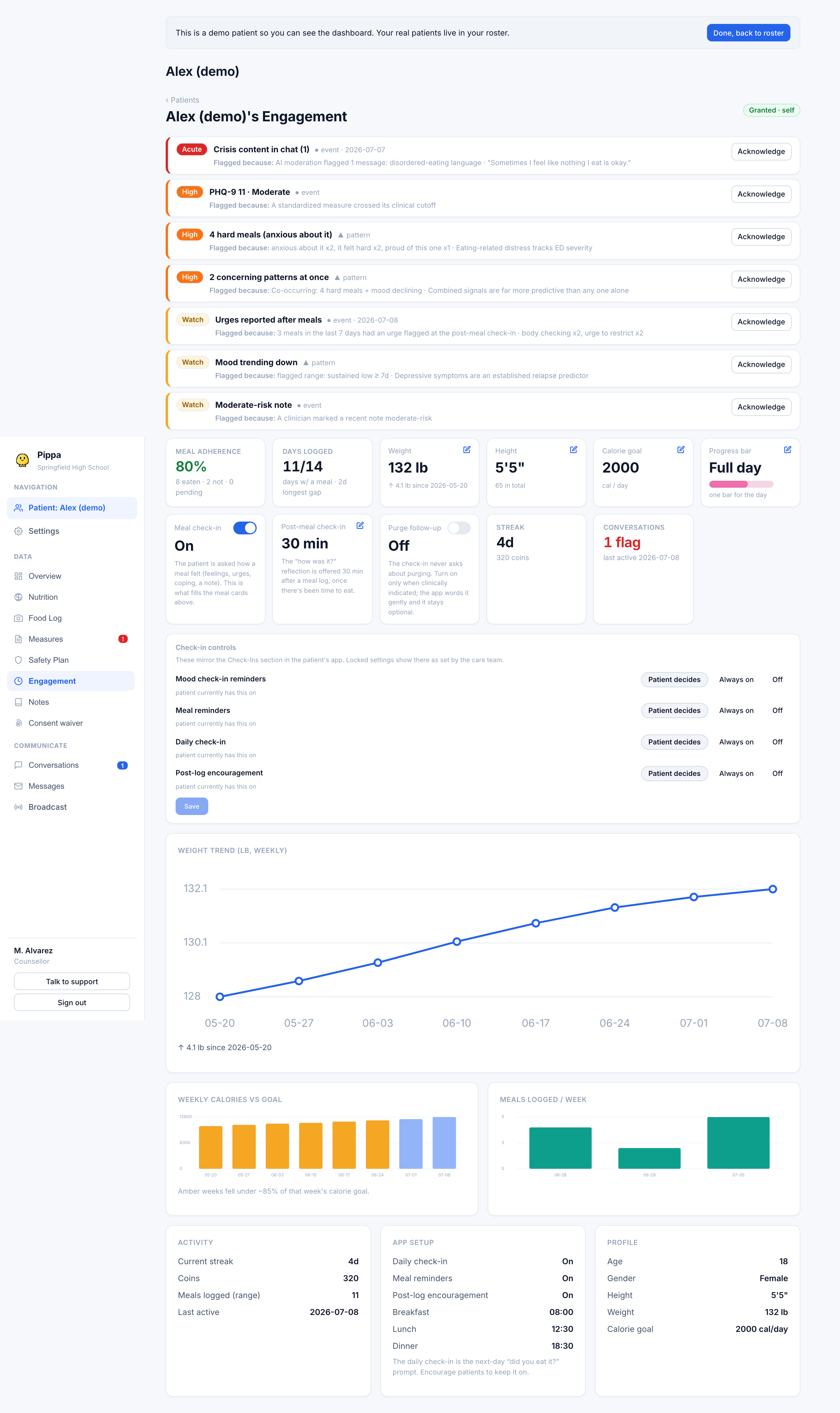
Read these three signals together:
- Check-ins per week. How often the patient is completing check-ins, shown against the previous week so you can see whether engagement is climbing or fading. A drop is worth a gentle nudge, not an alarm.
- Streak. Consecutive days of activity, alongside the coins they have earned. A streak is an encouragement signal, never a clinical target, and a broken streak is not a relapse.
- Last active. When the app last saw them. A patient who has gone quiet for a stretch may need outreach, especially if paired with a concern on their overview.
Low engagement is a prompt to reach out, not a verdict. Read it next to the clinical tabs: a patient can be quiet in the app and still doing well, or busy in the app and still struggling. Weight, measures, and meal adherence carry the clinical weight.
The tab also surfaces the patient's app setup (whether their daily check-in and meal reminders are on) and their profile basics, so you can see whether the tools that drive these numbers are even switched on. If a patient's daily check-in is off, that is often why their meal-adherence data looks thin.