
The post-meal check-in
The delayed 'how was it?' reflection: fullness, feelings, urges, the clinician-gated purge follow-up, coping skills, your custom questions, and the thought diary.
After a meal is logged, Pippa does not immediately ask how it went. For someone in recovery, the hard window is often the 10 to 60 minutes after eating, not the moment of logging. So the reflection is delayed on purpose.
The how was it? card arrives a set number of minutes after a meal is logged, delivered as a gentle notification. You set that delay from the dashboard: Off, 15, 30, 45, 60, or 90 minutes. Off means Pippa never auto-asks. The app default, if you never set it, is 30 minutes. Asking about fullness and urges before the person has eaten is backwards for recovery, which is why this moved to a delay.
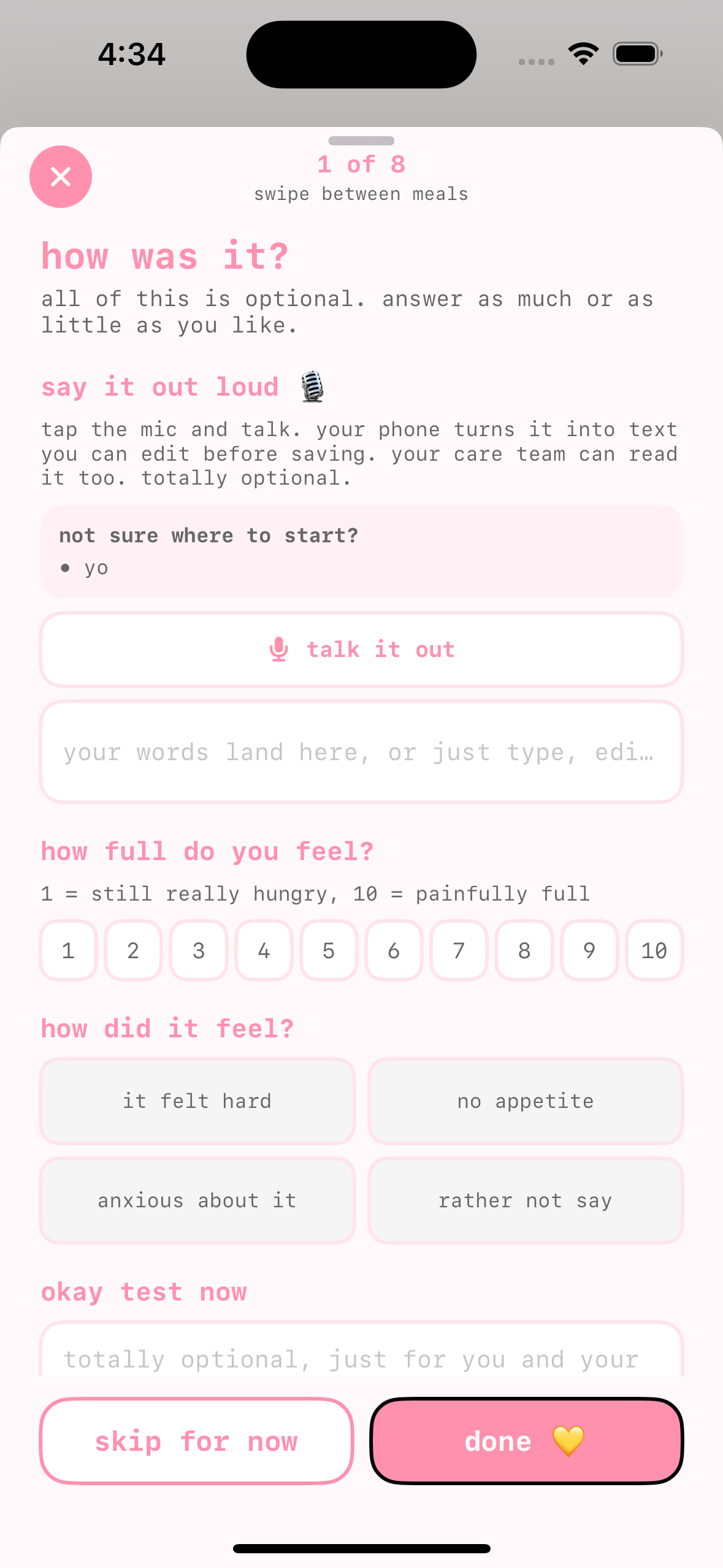
The card opens with how was it? and the reassurance all of this is optional. answer as much or as little as you like. Every section can be left blank. The two buttons at the bottom, skip for now and done 💛, carry equal visual weight, and skip for now stores nothing at all: no empty record, no "skipped the check-in" signal on your dashboard, and no re-prompt for that meal.
Here is every section, in order.
Every section below has its own toggle in the check-in question editor on the dashboard, so the sheet can be as short as you want it for a given patient. A section you turn off simply is not asked; nothing shows as disabled or missing.
Fullness
how full do you feel? A 1 to 10 scale, labeled 1 = still really hungry, 10 = painfully full. Tapping the selected number again clears it. You can instead show this as a five-emoji scale from the check-in question editor; the client taps a face rather than a number, and can swap in their own emojis, while the value reaches you the same way.
How it felt
how did it feel? with the feeling chips it felt hard, no appetite, anxious about it, and rather not say. Note the chips describe how it felt, never how much was eaten.
Did this match your plan?
Shown only when you have set an exchange or plate target for that slot. Chips are yes, mostly, no, with the note no pressure either way, this just helps your care team.
When the patient's care approach is intuitive eating, this plan-adherence question is replaced with a satisfaction reflection (was it satisfying?), an optional pre-meal hunger cue is added, and the emoji fullness scale is preferred over numbers.
Urges
anything feel hard? with naming an urge takes some of its power away. The urge chips read the urge to eat less later, the urge to get rid of it, the urge to keep eating past comfort, and checking my body.
Selecting an urge is treated as brave honesty. It never lowers the pet's mood, breaks a streak, or changes coins. It surfaces as a gentle, information-tone signal to you.
The purge follow-up (clinician-gated)
This section is off by default and appears only when you turn it on for that client. When on, it sits between urges and coping skills, titled did you act on the urge to get rid of it? The subtitle frames honesty as self-care: your care team asked to check in on this. an honest answer is never a failure, it helps them support you. The single-select chips are yes, no, and rather not say, which is always a real answer. The wording reuses the urge chip's own phrase and never names any method.
Coping skills
did you try a coping skill? with chips breathing, riding the wave, 5-4-3-2-1 grounding, self-kindness, and something else. A try one now › link opens the coping tools right there.
Your custom questions
If you added custom questions for this patient, they are asked here, after coping skills and before the thought diary, up to ten of them. Each renders in the sheet's own style: a short text box, your answer chips, or a 1-to-X scale. Like everything else on the sheet they are optional, and the answers come back to you as prompt: value chips on the meal cards in the dashboard Food Log.
Thought diary
A free text box titled thought diary, placeholder anything on your mind about this meal, just for you and your care team. If it contains crisis language, Pippa gently surfaces resources while still saving the note.
When you turn on the voice diary, the client can talk instead of type here. Their phone transcribes what they say on the device, they can edit the text before saving, and only that finished text reaches you; the audio never leaves the phone. Any short talking prompts you added show on screen to give them something to speak to.
Changing answers later
Nothing about the check-in is one-shot. Tapping any logged meal opens the meal detail, where the same questions appear inline under the header how it felt 💛 with the note all optional. tap to change anything, it saves when you close. There is no separate edit mode or save button; whatever they adjust is stored when the detail closes, and your dashboard reflects the updated answers. This also means a client who tapped skip for now in the moment can come back and fill things in hours later, which many do once the hard window has passed.
The catch-up prompt
Because skip for now and missed notifications are common, Pippa gives one gentle second chance. When a client logs a new meal while an earlier meal from the last few hours still has no check-in, a small optional pop appears on the log page: 💛 one more thing / want to add how your last meal felt? no pressure either way. with check in and not now. Choosing check in opens the how-was-it card for that earlier meal, with its photo, right there on the log page. It only appears when you have the check-in turned on, only for a recent un-checked-in meal, and at most once per meal, so it nudges without nagging.
After they finish
If any urge was selected, or the purge answer was yes, Pippa offers open the coping tools before closing. Otherwise a short affirmation lands and the card closes on its own.